





A comprehensive overview of backup approaches: from strategy and backup types to choosing platforms, storage and recovery technologies. The article is intended for IT teams that aim to ensure resilience, automate data control and reduce the risk of business downtime.
Purpose and Principles of Backup
Backup is not just a technical task, but a core element of a business continuity strategy. It protects infrastructure from losses caused by attacks, failures, errors and physical risks. Without a regular and properly designed backup plan, any IT system becomes vulnerable.
The key backup parameters are RTO, acceptable recovery time, and RPO, the maximum acceptable amount of data loss. These metrics determine how often copies need to be created and how much time can pass before full system recovery without damage.
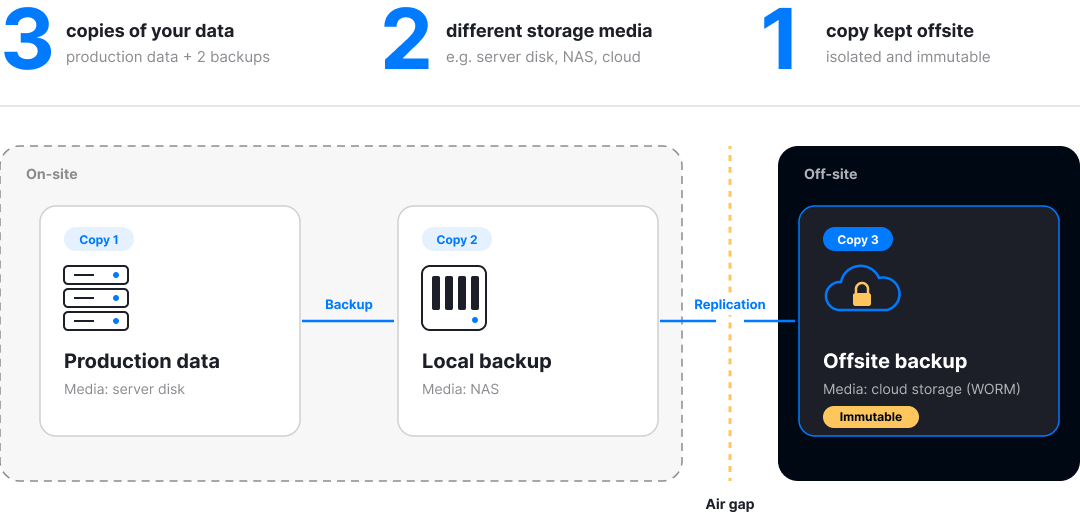
The strategy must account for physical and logical separation of copies, including immutable backup, immutable storage, and air-gap, isolation from network access. This is especially critical for protection against ransomware attacks, where an attacker may delete or encrypt even the backups.
What Is the 3-2-1 Strategy and Why Is It Essential?
3-2-1 is a fundamental model: 3 copies of data, 2 on different types of media, 1 physically isolated from the network. Additionally, it is recommended to use immutable backup and encryption to protect against logical and physical compromise.
Ignoring this approach often leads to fatal losses: during an attack, copies may become unavailable or damaged. Senseti has implemented automatic verification of the 3-2-1 model and copy integrity through integration with Fortinet FortiSIEM and Zabbix.

Main Backup Methods
A backup system is not simply “copy everything every day.” For effective recovery, it is necessary to consider volumes, change frequency, RTO/RPO requirements and budget. The main methods are full, incremental, differential, as well as CDP (continuous data protection) and snapshots. The choice depends on how critical the data is and how quickly it must be restored.
A full backup is the foundation of all strategies. It creates a copy of the entire data volume, which simplifies recovery but requires significant resources. Incremental and differential methods solve the problem of excessive storage consumption: they record only changes, reducing network load and accelerating processes. However, recovery requires more steps and computational operations.
Additional methods, such as CDP, record every data change in real time. This reduces RPO to seconds but increases infrastructure requirements. Snapshots, point-in-time copies of data states used in VMware, Nutanix or HPE StoreOnce, are well suited for recovery points of systems and configurations. Senseti recommends hybrid strategies: for example, combining daily incremental backups and weekly full backups with automatic routing to the cloud and local NAS through Zabbix or Commvault.
What Is the Difference Between Incremental and Differential Backup?
Incremental backup saves only the changes made since the last backup, of any type, while differential backup saves changes since the last full backup. This affects backup and recovery speed, as well as storage usage.
The incremental method is effective for frequent backups and deduplication use, as in Veeam and Rubrik. Differential backup is preferable for small companies with a simplified recovery policy, where stability and predictability are important.
Main backup methods:
- Full backup, a copy of all data, simple recovery, high load.
- Incremental, minimized load, more complex recovery.
- Differential, a compromise between the two approaches.
- Snapshots, fast preservation of VM and application states, used in Nutanix, HPE.
- CDP (Continuous Data Protection), near-zero RPO, continuous recording of changes.
Tools such as Commvault allow teams to combine methods and apply automated retention policies with deduplication, encryption and transfer over secure channels. Senseti integrates these scenarios into CI/CD pipelines through API.
Data Storage: Where to Place Backup Copies
The type of storage directly affects data availability, reliability and recovery speed. When designing backup architecture, it is important to consider both local (on-prem) and distributed (offsite) scenarios. Common options include NAS, SAN, cloud services, data centers and removable devices. Each has its own characteristics in management, scaling and risk protection.
NAS (Network Attached Storage) is a convenient and relatively affordable solution for small and medium-sized businesses. It integrates easily into LAN, provides fast access and scales easily. At the same time, SAN (Storage Area Network) is a high-performance storage environment designed for large infrastructures where fast recovery of large data volumes is critical.
For geo-redundancy, cloud storage with WORM (Write Once Read Many) and immutable backup support is increasingly used, making it resilient to ransomware. Large organizations also rent space in data centers, where data copies are placed in protected and reserved zones, often with offsite and geo-redundancy functions. At the edge of the spectrum are removable media, usually an outdated and highly vulnerable solution used only as a temporary measure or as part of cold storage strategies.
NAS Storage or Cloud, What to Choose in 2026?
NAS offers control, high access speed and independence from external providers, but requires investment in physical infrastructure and protection. It is a suitable solution if the company has a developed internal IT department and local autonomy is important. NAS is also convenient for hybrid solutions where critical backups are duplicated to the cloud.
Cloud storage wins in flexibility and scalability. With proper configuration, immutable, multi-factor authentication and SIEM integration, it provides a high level of security. However, reliable operation requires a stable internet connection, and storage costs for large volumes may be higher than with on-prem solutions. Senseti recommends a combined strategy, placing part of the copies locally, NAS, and the rest in the cloud with geo-redundancy and CMDB integration.
Choosing Backup Solutions and Tools
The choice of a backup platform depends on the scale of the infrastructure, automation requirements, replication capabilities and the maturity level of security processes. The market offers dozens of solutions, from Veeam and Rubrik to Commvault and proprietary tools such as Senseti BaaS. Each system offers its own approach to deduplication, orchestration and storage.
Veeam is popular in the SMB segment due to simple setup, virtualization integration and scalability. Rubrik focuses on cloud technologies and an API-oriented approach. It fits well into DevOps environments. Commvault offers a universal platform with deep automation capabilities, support for SIEM/CMDB integration, policy-driven backups and powerful reporting. Senseti offers customized Commvault deployments and its own scenarios for asset auto-discovery and classification.
Main criteria for choosing a platform:
- Support for different backup types: full, incremental, CDP
- Integration with cloud and on-prem storage
- RTO/RPO policies and SLA settings
- Automation of patching and backup operations
- Support for WORM, immutable backup and multi-tenant environments
What Does Commvault Offer Compared to Other Platforms?
Commvault stands out because it provides a unified stack for backup, recovery, protection and data management. It is an Enterprise-level platform that supports policy-based backup, CMDB synchronization, audit report generation and end-to-end integration with SIEM systems. Use cases include backup of workstations, servers, virtual machines and clouds, with flexible routing and deduplication.
Additionally, Commvault provides tools for DR (Disaster Recovery) automation, which makes it possible not only to restore data quickly, but also to recreate critical business services in new locations. Senseti implements Commvault with preliminary asset analysis, adapting the backup policy to business goals and regulatory requirements.
Recovery Practice: Algorithms, Metrics, Scenarios

Backup makes no sense without reliable and fast recovery. Any incident, from hardware failure to a cyberattack, requires a clear DR plan (Disaster Recovery) with predefined RTO (Recovery Time Objective) and RPO (Recovery Point Objective). These indicators define the maximum acceptable time and volume of data loss during recovery.
The recovery algorithm depends on the selected backup strategy and storage type. For example, with incremental backup, sequential reconstruction of all changes will be required, while with CDP (Continuous Data Protection), near-instant replication is available. Therefore, the choice of tool and architecture directly affects how quickly operations can resume. A combined approach, fast local copies and offsite immutable copies, is considered the most resilient.
DR scenarios require regular updates and testing. Commvault, Rubrik and Senseti DR configurators allow teams to simulate failures and practice actions under infrastructure outage conditions. Practice shows that companies with an updated DR plan restore operational activity 3–5 times faster.
Main elements of effective recovery:
- RTO does not exceed acceptable SLA
- Automation of DR scenario launch
- Reporting in CMDB and SIEM
- Availability of tested action procedures
- Replication to a separate geo-zone or cloud
Testing and Control of Backup Copies
Creating backups is only the beginning. Without regular testing, backup copies lose their value: files may be damaged, incomplete or unavailable. According to statistics, about 25% of recoveries end in partial or complete failure, the reason is lack of integrity control.
Testing is carried out at several levels. The basic level includes checking the completion of copy operations and log control. The advanced level involves simulating recovery from a backup copy with recording of deviations, speed and data accuracy. Systems such as Veeam Monitoring, Commvault Validate or Senseti Data Trust automate verification and notify administrators about failures in the backup chain.
It is especially important to perform checks after major updates, configuration changes or data migration. Integration with SIEM and Zabbix is also relevant for centralized event control, allowing teams to track dynamics, detect anomalies and generate reports for auditors.
How to Test Backups Without Wasting Time and Resources?
Regular testing does not necessarily require manual intervention. Modern backup platforms allow verification to be automated: daily, weekly or event-based. For example, Commvault uses scheduled recovery testing mechanisms with reporting and logs in CMDB or SIEM.
In high-load scenarios, it is preferable to run partial tests, restoring 5–10% of copies by sample. This reduces hardware wear and provides a statistically reliable assessment of integrity. It is also important to analyze RTO and adapt procedures depending on actual recovery values. Senseti uses its own dashboards based on Zabbix and Grafana to monitor recovery parameters and identify bottlenecks.
Conclusion: Backup as a Strategic Necessity
Effective backup has long moved beyond an IT function, it is a critical element of a business continuity strategy. Data loss, SLA violations and service downtime directly affect finances, customer experience and company reputation. A reliable backup architecture with RTO, RPO, air-gap and immutable copies helps minimize any risks, from cyberattacks to infrastructure failures.
A systematic approach requires more than simply configuring backup jobs. It includes choosing the right types of storage, NAS, cloud, data center, regular testing of copies, recovery automation and integration with SIEM/CMDB. Modern platforms such as Veeam, Commvault, Rubrik and Senseti give businesses control, transparency and predictability across all processes related to data protection.
Senseti helps companies design backup architecture based on industry requirements, infrastructure specifics and process maturity. From solution selection and recovery automation to integrity monitoring and integration with security systems, everything is built around specific scenarios and business goals. This is not just technology, it is an infrastructure foundation for resilience and growth.