




Virtualization has become a key tool for business digital transformation. Learn what virtual machines and hypervisors are, how virtualization architecture works, and why this technology allows companies to increase ROI, reduce costs, and implement next-generation cloud services.
Virtualization: The Foundation of Digital Transformation and Efficient Business
Virtualization is a technology that allows computing resources to be abstracted from physical hardware and used as flexible digital environments. It is based on three key elements: virtual machines, which act as standalone servers, hypervisors, which distribute resources between them, and cloud instances, which provide the same functionality, but in the form of a service from a provider.
Virtualization has become the foundation of the modern IT ecosystem: it made cloud computing possible, enabled more efficient server utilization, and allowed businesses to significantly increase the return on infrastructure investments. If companies previously had to maintain dozens of underloaded physical machines, today they can consolidate capacity and run dozens of applications on a single server.
For business, this means more than technical convenience. Virtualization provides:
- Cost optimization - fewer physical servers, lower electricity and maintenance costs.
- Greater flexibility and speed - fast application launch and scaling depending on workload.
- Support for digital transformation - a foundation for cloud services, IoT, and new business models.
How Virtualization Works: Basics and Architecture
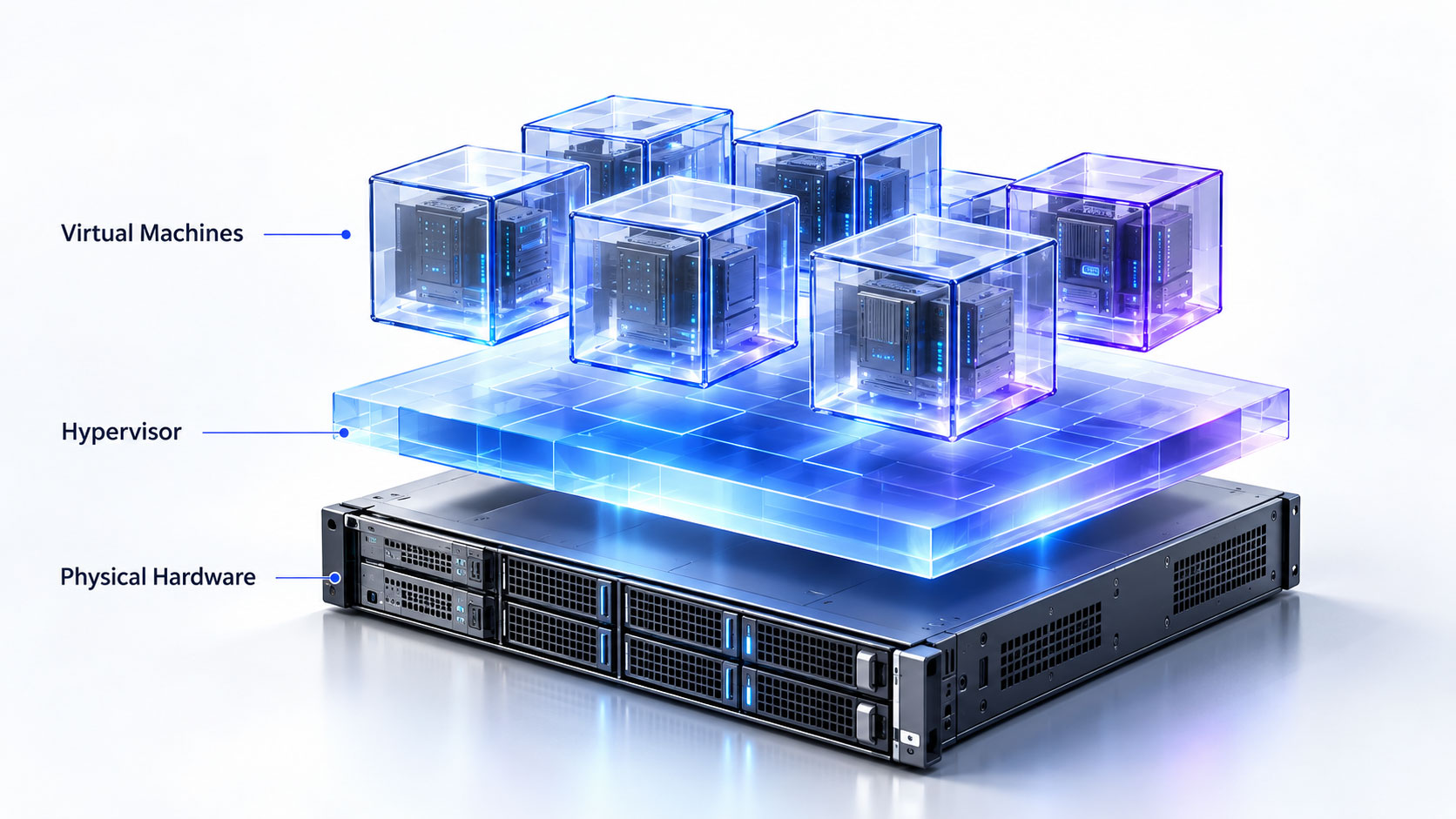
The key element in this architecture is the hypervisor. It acts as an intermediary between the hardware and virtual machines, allocating memory, CPU time, and storage so that each environment operates reliably. The workflow is simple: physical host → hypervisor → virtual machines or instances.
Hypervisors: Types and Role
There are two types of hypervisors. Bare-metal hypervisors, or Type 1 hypervisors, are installed directly on the server and provide maximum performance. This is why they are used in corporate data centers, for example VMware ESXi, KVM, and Microsoft Hyper-V.
Hosted hypervisors, or Type 2 hypervisors, run on top of an operating system. They are easier to configure, but less performant. They are popular in development and testing, for example VirtualBox or VMware Workstation.
Virtual Machines and Instances
A virtual machine (VM) is created and managed inside the company’s own infrastructure and requires administration by the IT department. An instance is essentially the same virtual machine, but provided by a cloud provider as a service.
For example, VMware vSphere allows companies to run and manage VMs on corporate servers, while AWS EC2 provides similar resources on demand through the cloud, where scaling and management are automated.
Main Types of Virtualization
Virtualization covers different levels of IT infrastructure and allows companies to use servers, storage, networks, workplaces, and even applications in a new way. It is not just resource savings, but a comprehensive approach that gives businesses flexibility, automation, and resilience under load.
There are five key areas: server virtualization, storage virtualization (SAN/NAS), network virtualization (SDN and NFV), desktop virtualization (VDI and DaaS), as well as application and data virtualization. Each of them solves its own task: from server consolidation to centralized management of thousands of workplaces.
Servers, Storage, and Networks
Server virtualization is the basic scenario where a physical server is divided into several virtual ones, allowing it to be utilized at 70-80% instead of the traditional 15-20%. Platforms such as VMware ESXi, Microsoft Hyper-V, and KVM are used for this.
Storage virtualization combines SAN and NAS devices into a single pool, making data management flexible and independent from hardware.
Network virtualization (SDN and NFV) changes the very logic of how corporate networks operate. Solutions such as Cisco ACI or VMware NSX allow companies to create software-defined segments, distribute workloads, and instantly apply security policies across the entire network.
Desktops and Applications
Desktop virtualization provides employees with centralized access to corporate resources. VDI (Virtual Desktop Infrastructure) and DaaS (Desktop as a Service) allow desktops to be launched from a data center or cloud, reducing local hardware requirements and improving security. In practice, this is implemented through solutions such as Citrix Virtual Apps & Desktops, VMware Horizon, and Windows Virtual Desktop.
A separate area is application virtualization. With it, companies can run programs in environments different from the original operating system or centrally manage their distribution. Platforms such as Red Hat OpenShift allow applications to be moved into containers and scaled easily.
Business Cases and Benefits of Virtualization

Virtualization has become one of the main drivers of IT optimization because it allows servers to be utilized at 70-80% instead of 15-20%, while also reducing capital and operating expenses by up to 30-40%. For many companies, it has become the foundation for moving to the cloud and implementing DevOps practices.
The key benefits include not only cost savings, but also new capabilities: fast disaster recovery through Disaster Recovery as a Service, automated deployment of Dev/Test environments, data center scalability, and workplace security through VDI and DaaS.
Scenarios for Different Industries
Virtualization is actively used across different sectors of the economy. In banks, it is used to create secure VDI environments and work with confidential customer data. In manufacturing, virtualization makes it possible to run SCADA systems and integrate IoT sensors without additional physical servers.
In retail, it supports customer behavior analytics and POS system operations. For startups and small businesses, cloud instances provide the ability to scale services quickly without investing in hardware.
Virtualization, Cloud, and Containerization: What They Have in Common and How They Differ
Virtualization became the foundation for cloud computing because it made it possible to abstract hardware and run dozens of virtual servers on a single host. But today, containerization has been added to this model, changing the approach to application creation and management.
It is important to understand the difference: a virtual machine emulates a full server with an operating system and dedicated resources, while a container runs on top of the host OS and uses shared kernels. A cloud instance is a provider-managed virtual machine available through an API.
Classic platforms such as VMware vSphere and Microsoft Hyper-V remain essential in corporate data centers, while Docker, Kubernetes, and OpenShift provide flexibility for microservice architecture and DevOps processes. The choice depends on the task: stable corporate services are easier to deploy in virtual machines, while dynamic digital products are better scaled through containers.
Key comparison:
- Virtual machines - versatility and isolation.
- Instances - cloud elasticity and the pay-as-you-go model.
- Containers - lightness, speed, and a development-oriented approach.
Containers vs Virtual Machines
Containers are lighter and faster: they start in seconds and allow services to scale without excessive resource consumption. Virtual machines are heavier, but provide maximum isolation and stability.
In practice, companies use a hybrid approach: core services run on virtual machines, while microservices and Dev/Test environments operate in containers managed by Kubernetes or OpenShift.
Technologies, Solutions, and the Role of the Integrator
The modern virtualization and cloud market offers dozens of solutions, from classic hypervisors to public clouds and hybrid platforms. Choosing the right option requires an understanding of the company’s architecture, business goals, and IT process maturity.
Vendors such as VMware, Microsoft (Hyper-V), Citrix, Nutanix, Proxmox, and KVM cover server, network, and workplace virtualization needs. Cloud providers such as AWS, Microsoft Azure, Google Cloud, and Oracle Cloud offer Infrastructure as a Service (IaaS), where instances and storage can be created in minutes.
Security remains a critical factor: network segmentation, regular updates, access control, and integration with SIEM, SOC, and DLP systems.
Senseti Group as a Virtualization Integrator
Senseti Group acts as a strategic partner for companies that want to build modern virtualized infrastructure. We audit existing environments, select solutions from leading vendors, design architecture, and integrate it into existing SOC and monitoring systems.
The role of an integrator is not limited to deploying hypervisors or connecting the cloud. It is about building a secure and scalable ecosystem: from VMware vSphere and Hyper-V to AWS EC2 and Azure VM. Senseti Group provides ongoing support and maintenance, helping businesses get maximum ROI from their virtualization investments.